Traefik SSL on VPS: Complete Setup Guide
Set up Traefik as a reverse proxy with automatic Let's Encrypt SSL certificates. The foundation for hosting multiple apps on one VPS.
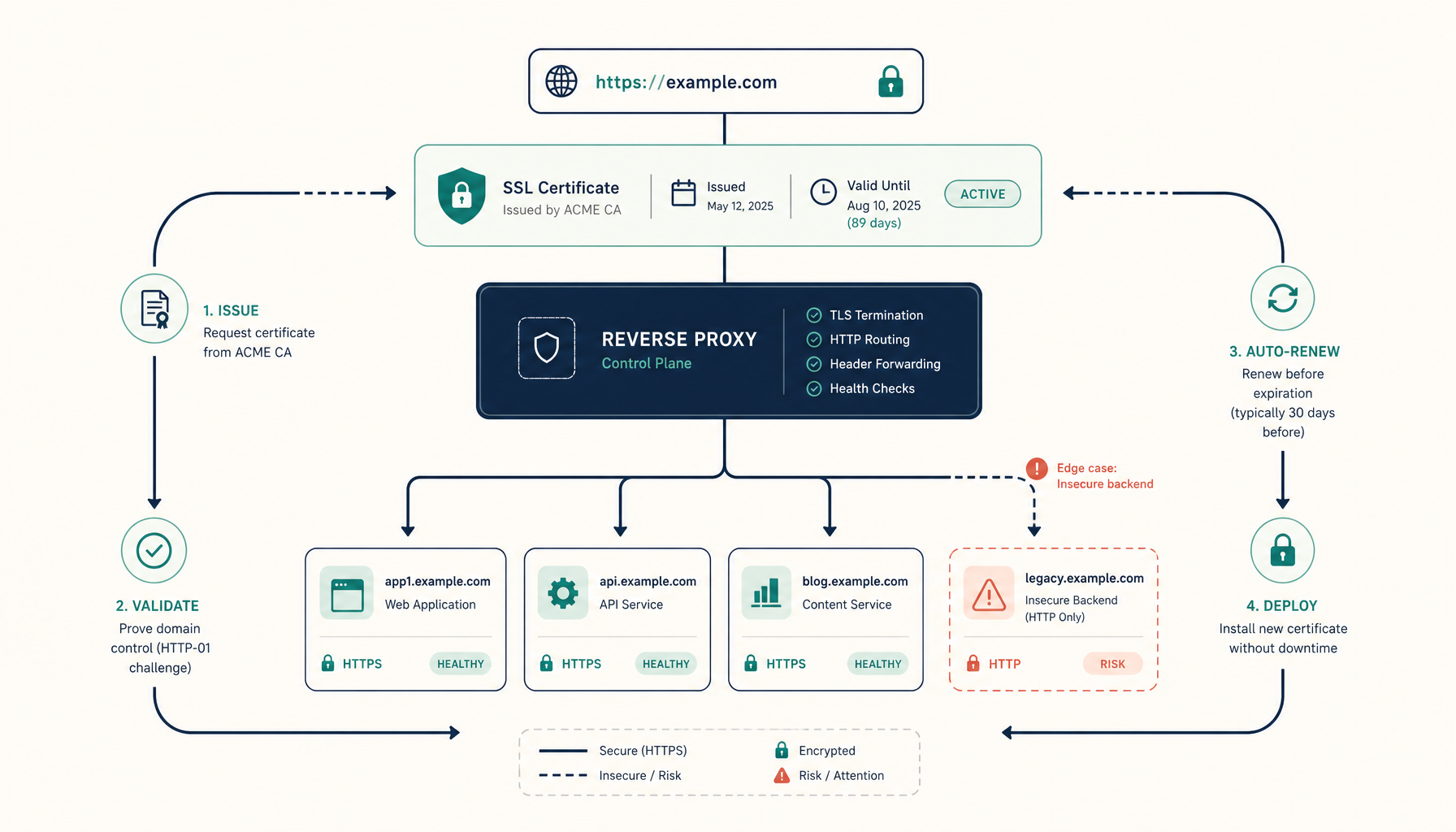
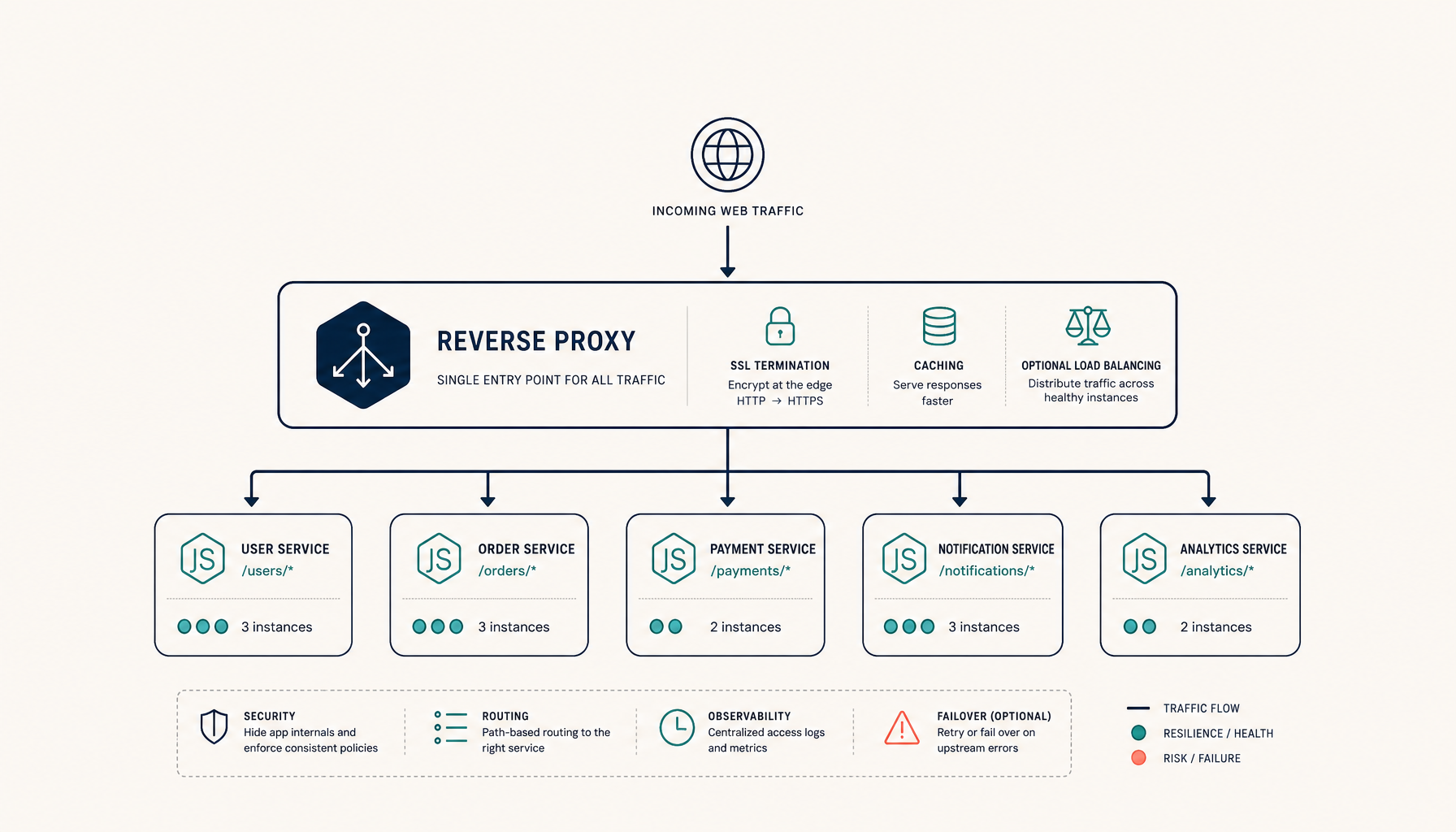
Traefik is a modern reverse proxy that automatically discovers your Docker containers and handles SSL certificates. Once set up, adding new apps with HTTPS is trivial.
What you will have at the end
- Traefik running as your edge router
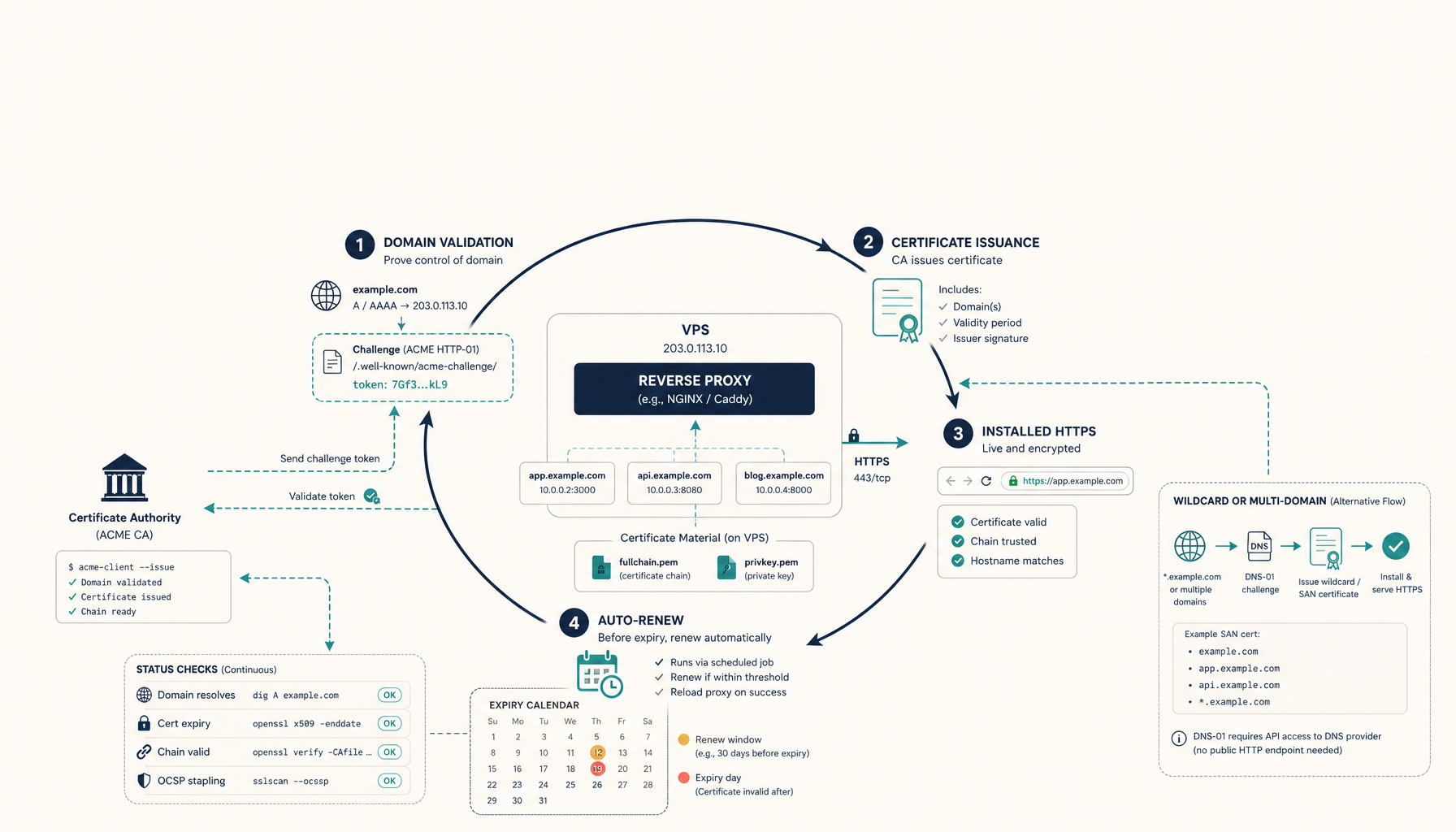
- Automatic Let's Encrypt certificates for all domains
- HTTP to HTTPS redirect
- A foundation for hosting unlimited apps on one VPS
Step 1: Create the Traefik directory structure
mkdir -p ~/traefik
cd ~/traefik
touch acme.json
chmod 600 acme.json
The acme.json file stores your SSL certificates. The 600 permission is required by Traefik.
Step 2: Create the Docker network
Traefik needs a shared network to communicate with your app containers.
docker network create traefik-public
Step 3: Create the Traefik configuration
Create traefik.yml:
api:
  dashboard: true
  insecure: false

entryPoints:
  web:
    address: ":80"
    http:
      redirections:
        entryPoint:
          to: websecure
          scheme: https
  websecure:
    address: ":443"

providers:
  docker:
    endpoint: "unix:///var/run/docker.sock"
    exposedByDefault: false
    network: traefik-public

certificatesResolvers:
  letsencrypt:
    acme:
      email: [email protected]
      storage: /letsencrypt/acme.json
      tlsChallenge: true
Replace [email protected] with your email for Let's Encrypt notifications.
Step 4: Create docker-compose.yml
services:
  traefik:
    image: traefik:v3.0
    container_name: traefik
    restart: unless-stopped
    security_opt:
      - no-new-privileges:true
    ports:
      - "80:80"
      - "443:443"
    volumes:
      - /var/run/docker.sock:/var/run/docker.sock:ro
      - ./traefik.yml:/traefik.yml:ro
      - ./acme.json:/letsencrypt/acme.json
    networks:
      - traefik-public
    labels:
      - "traefik.enable=true"
      # Dashboard (optional - remove in production or secure properly)
      - "traefik.http.routers.dashboard.rule=Host(`traefik.yourdomain.com`)"
      - "traefik.http.routers.dashboard.service=api@internal"
      - "traefik.http.routers.dashboard.entrypoints=websecure"
      - "traefik.http.routers.dashboard.tls=true"
      - "traefik.http.routers.dashboard.tls.certresolver=letsencrypt"
      # Basic auth for dashboard (generate with: htpasswd -nb admin password)
      - "traefik.http.routers.dashboard.middlewares=auth"
      - "traefik.http.middlewares.auth.basicauth.users=admin:$$apr1$$xyz..."

networks:
  traefik-public:
    external: true
Step 5: Start Traefik
docker compose up -d
Check the logs to ensure certificates are being issued:
docker logs -f traefik
You should see messages about ACME certificate generation.
Step 6: Deploy an app with automatic SSL
Now any app can get automatic HTTPS by joining the traefik-public network and adding labels.
Example docker-compose.yml for a web app:
services:
  myapp:
    image: nginx:alpine
    restart: unless-stopped
    networks:
      - traefik-public
    labels:
      - "traefik.enable=true"
      - "traefik.http.routers.myapp.rule=Host(`app.yourdomain.com`)"
      - "traefik.http.routers.myapp.entrypoints=websecure"
      - "traefik.http.routers.myapp.tls=true"
      - "traefik.http.routers.myapp.tls.certresolver=letsencrypt"
      - "traefik.http.services.myapp.loadbalancer.server.port=80"

networks:
  traefik-public:
    external: true
Deploy with:
docker compose up -d
Traefik will automatically:
- Detect the new container
- Request an SSL certificate from Let's Encrypt
- Route traffic to your app
Step 7: Verify SSL
curl -I https://app.yourdomain.com
You should see a 200 response with valid SSL.
Check certificate details:
echo | openssl s_client -servername app.yourdomain.com -connect app.yourdomain.com:443 2>/dev/null | openssl x509 -noout -dates
Common Traefik labels explained
# Enable Traefik for this container
- "traefik.enable=true"

# Route requests for this domain to this container
- "traefik.http.routers.myapp.rule=Host(`example.com`)"

# Use the HTTPS entrypoint
- "traefik.http.routers.myapp.entrypoints=websecure"

# Enable TLS
- "traefik.http.routers.myapp.tls=true"

# Use Let's Encrypt for certificates
- "traefik.http.routers.myapp.tls.certresolver=letsencrypt"

# Tell Traefik which port your app listens on
- "traefik.http.services.myapp.loadbalancer.server.port=3000"
Multiple domains on one app
labels:
  - "traefik.http.routers.myapp.rule=Host(`example.com`) || Host(`www.example.com`)"
Path-based routing
labels:
  - "traefik.http.routers.api.rule=Host(`example.com`) && PathPrefix(`/api`)"
Troubleshooting
Certificates not being issued
Check DNS: Ensure your domain points to your VPS IP
dig +short yourdomain.comCheck ports: Ensure 80 and 443 are open
sudo ufw statusCheck Traefik logs:
docker logs traefik 2>&1 | grep -i acmeCheck acme.json permissions:
ls -la acme.json
# Should be -rw------- (600)
502 Bad Gateway
- Your app container isn't running or isn't on the
traefik-publicnetwork - The port in the label doesn't match your app's actual port
- Check:
docker network inspect traefik-public
Certificate renewal
Let's Encrypt certificates expire after 90 days. Traefik automatically renews them when they have less than 30 days remaining. No action needed.
Rate limits
Let's Encrypt has rate limits:
- 50 certificates per domain per week
- 5 duplicate certificates per week
For testing, use the staging environment:
certificatesResolvers:
  letsencrypt:
    acme:
      caServer: https://acme-staging-v02.api.letsencrypt.org/directory
      # ... rest of config
Where to go next
Tutorials:
Comparisons:
ServerCompass:
Related in the StoicSoft network
If you're choosing a VPS provider or benchmarking real-world performance like the post above explores, StoicVPS is the StoicSoft network's independent tracker for VPS pricing, performance, and migration safety.
From across the StoicSoft network
Hand-curated reads on the same topic from sister sites in the StoicSoft family.