Jellyfin on Linux: Choosing Between Docker Compose, Portainer, and a Template
Beginners stall on the first decision — how to actually deploy Jellyfin. Raw Compose, Portainer's UI, or a one-click template? A clear comparison so you pick once and move on.
Most people don't stall on running Jellyfin — they stall on the question before that: how do I even deploy it? The community throws three answers at a newcomer at once — write a docker-compose.yml by hand, use Portainer's web UI, or click a template — and the indecision costs more time than any of the methods would. Here's the honest comparison so you pick once and get to watching things.
The three methods, plainly
Raw Docker Compose. You write a docker-compose.yml and .env, manage volumes and ports yourself, and run docker compose up.
Portainer. A web UI over Docker. You still define the stack (often by pasting Compose), but you get buttons for start/stop/logs and a visual view of what's running.
A managed template. You pick "Jellyfin" from a catalog and the app, storage, and reverse proxy are provisioned for you.
They're not ranked best-to-worst — they're different trade-offs of control vs convenience.
Compare on what actually matters
| Raw Compose | Portainer | Template | |
|---|---|---|---|
| Learning curve | Steepest | Medium | Lowest |
| Control / customization | Total | High | Guided |
| TLS + reverse proxy | You wire it | You wire it | Usually included |
| Day-2 (logs, restart) | CLI | GUI buttons | GUI |
| Best for | Learners who want the internals | Visual managers of many stacks | "Just get it running well" |
Which should you pick?
- You want to learn Docker properly → raw Compose. The friction is the lesson, and you'll understand every container you run afterward. When you go this route, read the Jellyfin reverse-proxy and transcoding details so you wire the hard parts right.
- You run several stacks and want a dashboard → Portainer. It shines at managing many hand-defined stacks, less at making the first one easy.
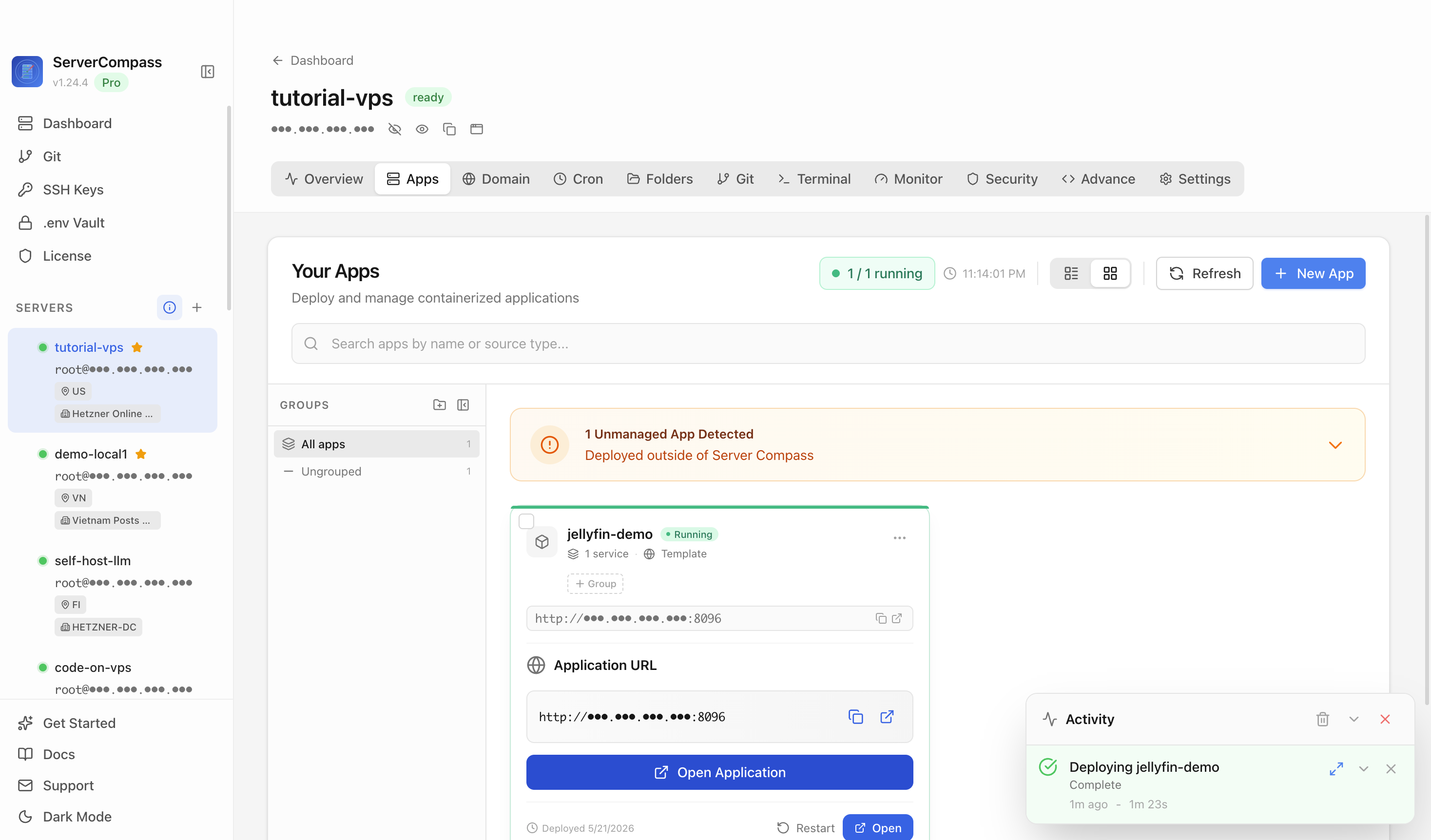
- You want a solid Jellyfin with TLS and backups, not a Docker course → a template. This is the app-first path: the win first, the concepts later.
The template path, concretely
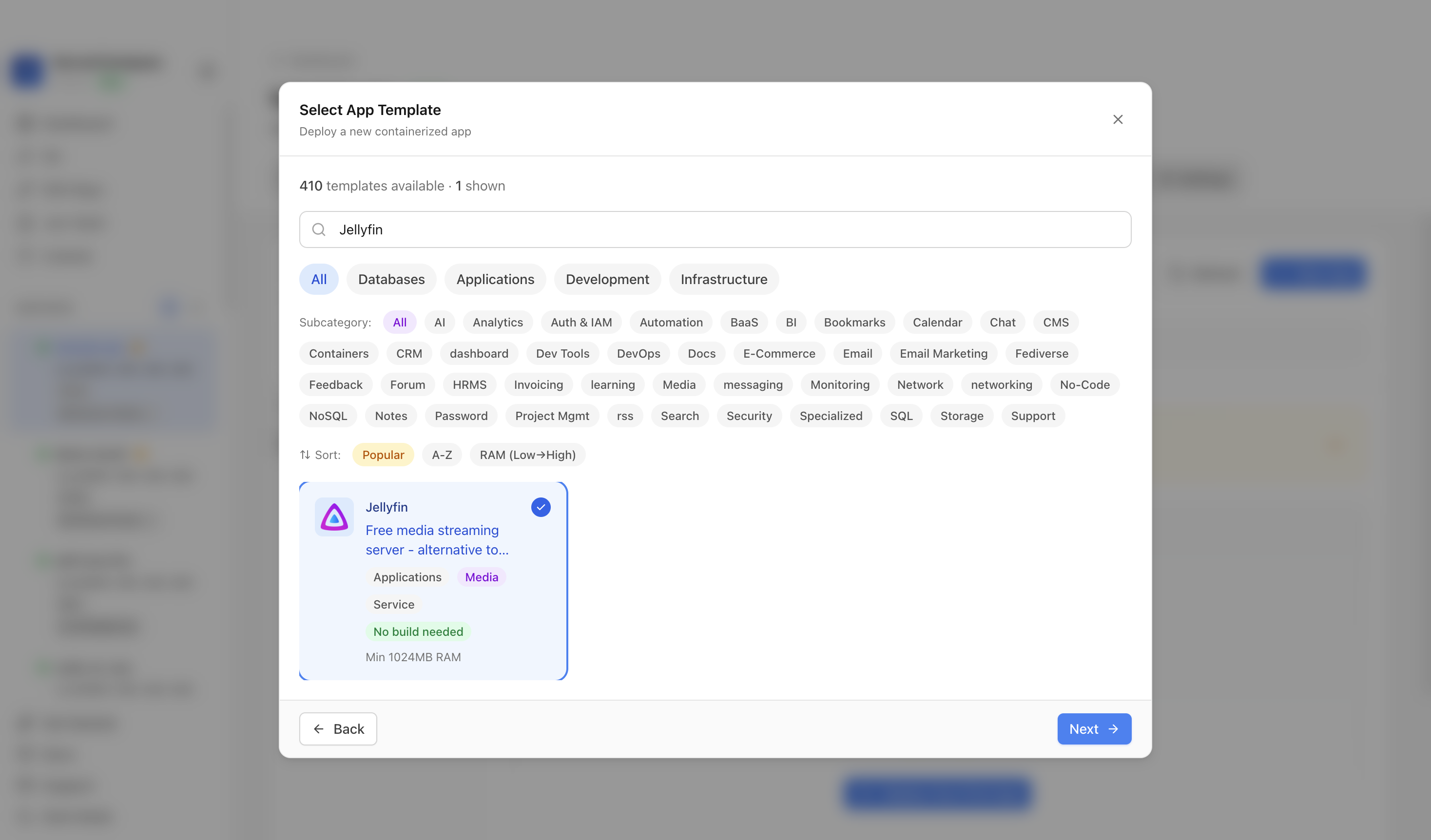 Choosing Jellyfin from a template catalog in ServerCompass — the database, storage, and reverse proxy are provisioned together instead of hand-edited, with the GPU and transcoding setup handled for you.
You can change your mind later
This isn't a permanent marriage. Because Jellyfin's data lives in volumes, you can start with a template and later "graduate" to hand-managed Compose by pointing a new Compose stack at the same volumes — the data-portability rule that makes any of these reversible. Pick the one that gets you running now; switching later is a volume move, not a redo.
Whatever you pick, get these right
- HTTPS from the start (the mobile/TV clients prefer a real cert).
- Library permissions and paths the container can actually read — the scan-failure trap.
- A backup of the Jellyfin database, not just the media.
Takeaway
The slowest part of deploying Jellyfin is choosing how. Raw Compose to learn, Portainer to manage many stacks visually, a template to just get a good instance fast — all three end at the same working server. Pick by which trade-off fits you today, knowing your data's portability lets you switch whenever you want.
From across the StoicSoft network
Hand-curated reads on the same topic from sister sites in the StoicSoft family.
 Deploy Handbook
Home-server app managers keep leaking abstraction at Docker, Compose, TrueNAS app, and Samba boundaries
Home-server app managers promise a friendlier interface over Docker, Compose, and storage services — but operators keep hitting the same wall: the UI covers 90% of what you need and leaves the last 10% completely inaccessible. Here is what those friction points look like in practice and how to plan around them.
Read on stoicvps.com/handbook Deploy Handbook8 min read
Compose stack managers are outgrowing Portainer before they actually need Kubernetes
Fresh self-hosted threads show operators stuck in the middle between a single Docker Compose VM and full platform engineering. One Portainer user is annoyed by git-cloned stack management and is evaluating Komodo, env repositories, TOML sync, and Ansible…
Read on stoicvps.com/handbook Deploy Handbook7 min read
Lighter Than Kubernetes: Compose vs Podman vs K8s for a Single-Node Homelab
You want more structure than loose docker run commands but suspect Kubernetes is overkill for one Proxmox box. A practical comparison of Compose, rootless Podman, Podman Kube, and lightweight K8s.
Read on stoicvps.com/handbook- Deploy Handbook
Self-hosters need a middle path between one Compose VM and full platform engineering
Most self-hosters eventually hit a wall: a single Docker Compose VM starts to creak, but building a full internal platform with Nomad, Consul, Vault, and custom automation is a project in itself. There is a practical middle path worth knowing.
Read on stoicvps.com/handbook