Vercel Pricing Breakdown (2026): Real Costs Explained
What Vercel actually costs in production. Build minutes, bandwidth, and serverless invocations add up faster than the pricing page suggests.
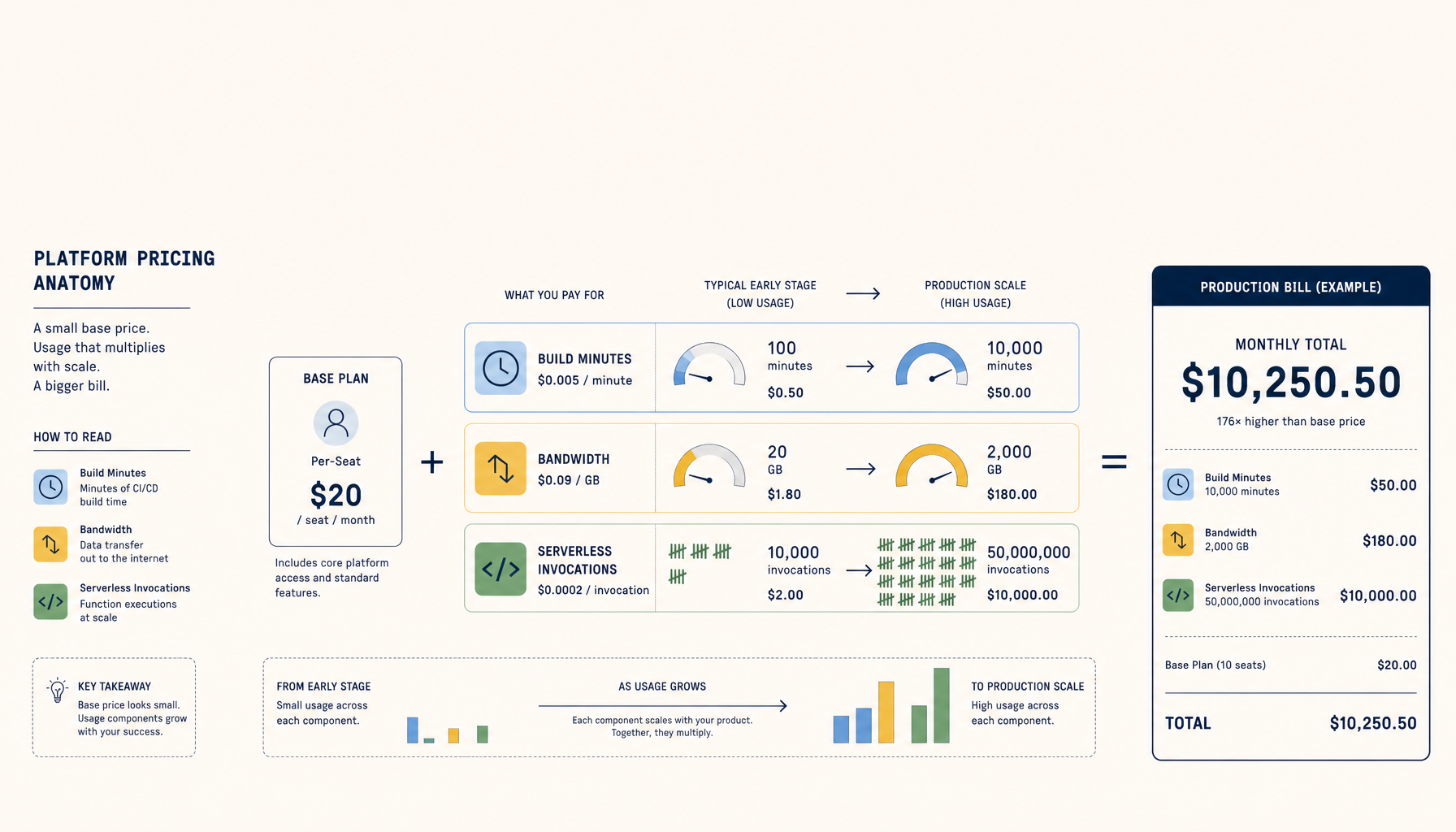
Vercel pricing looks simple on the surface: Hobby is free, Pro is $20/month per seat. But once you have real traffic, the bill tells a different story.
This is a breakdown of what Vercel actually costs, not the marketing version.
Pricing Tiers Overview
| Tier | Base Price | What You Get |
|---|---|---|
| Hobby | $0 | 1 user, 100GB bandwidth, 100 build hours |
| Pro | $20/seat/mo | Team features, 1TB bandwidth, 400 build hours |
| Enterprise | Custom | SLAs, advanced security, dedicated support |
The base price is not the problem. The overages are.
Real-World Cost Examples
Example 1: Side project (personal blog, portfolio)
- Traffic: 5,000 visitors/month
- Build minutes: 10/month
- Serverless invocations: minimal
Actual cost: $0/mo
The Hobby tier covers this easily. No surprises.
Example 2: Small SaaS (early product, 1-3 team members)
- Traffic: 50,000 visitors/month
- Build minutes: 50/month
- Serverless invocations: 500k/month
- 2 team members on Pro
Actual cost: $40-60/mo
The $40 base (2 seats) plus potential overage on serverless functions. This is where you start watching the dashboard.
Example 3: Growing startup (real traffic, active development)
- Traffic: 500,000 visitors/month
- Build minutes: 200/month
- Serverless invocations: 5M/month
- 5 team members on Pro
- Edge functions, image optimization
Actual cost: $150-300/mo
Per-seat pricing stacks. Bandwidth and function invocations add variable cost. Image optimization and edge compute are separate line items.
Hidden Costs to Watch
1. Per-seat pricing compounds fast
$20/seat sounds fine until you have 8 developers. That is $160/month before any usage.
2. Serverless function invocations
The free tier includes 100k invocations on Hobby, 1M on Pro. After that, you pay per million. API-heavy apps hit this limit faster than expected.
3. Bandwidth overages
Pro includes 1TB. Sounds like a lot until you serve images, PDFs, or large API responses. Overage is $40/100GB.
4. Build minutes during active development
If your team pushes frequently and your builds take 5+ minutes, 400 hours goes faster than you think. Overage is $10/100 hours.
5. Image optimization
Vercel's image optimization is convenient but priced separately. High-traffic sites with many images can see this line item grow.
Cost Comparison
| Platform | Starter | Production | Model |
|---|---|---|---|
| Vercel | $20/seat | $80-300+ | Per-seat + usage |
| Railway | $15 | $60+ | Usage-based |
| Fly.io | $5 | $25-50 | Resource-based |
| Render | $19 | $50-100 | Per-service |
| Hetzner VPS | $6 | $12-25 | Flat monthly |
When Vercel Makes Sense
Use Vercel when:
- You prioritize developer experience over cost optimization
- Your team deploys Next.js apps and wants zero-config
- You need edge functions and global CDN without setup
- Your traffic is predictable or you have budget flexibility
Consider switching when:
- Per-seat pricing exceeds your infrastructure budget
- You have stable traffic and can accept some ops work
- You run multiple apps and want consolidated billing
- Serverless invocation costs become unpredictable
The VPS Alternative
A single Hetzner VPS ($6-12/mo) can host multiple apps with:
- Flat, predictable cost
- No per-seat charges
- No invocation limits
- Full control over your stack
The tradeoff is setup time and ops responsibility. Tools like ServerCompass bridge this gap.
My Recommendation
Vercel is excellent for shipping fast. The DX is unmatched for Next.js.
But if your bill is climbing and your traffic is stable, a VPS migration pays for itself within 2-3 months for most teams.
Start on Vercel. Graduate when the math stops working.
Where to go next
Alternatives:
Tutorials:
ServerCompass:
Related in the StoicSoft network
If you're choosing a VPS provider or benchmarking real-world performance like the post above explores, StoicVPS is the StoicSoft network's independent tracker for VPS pricing, performance, and migration safety.